
Here's a cool web 2.0 tool that helps you compare the past with the present. It's called History Pin. Subjects include History, Modern Art, Science, and Technology. It's really interesting. Take a view of the video below and check out this awesome site. You do not need a log in to be able to view it.
You also get the chance to view pictures of old times with up to date real time images using Google Earth. Imagine starting a debate in your classroom of what Germany looked like in WWII versus what it looks like now, or maybe what it looked like before the Western United States was settled. You can control the time period in your search as well. Check out History pin here!
Thursday, April 28, 2011


Tuesday, April 5, 2011
Help vote for my grant!
Hello everyone,
I signed up for a grant at We Are Teachers. If I have the top number of votes my idea will win. What I am asking is for you to just take two seconds and click this link and along the side there will be a little box that says vote for me. If you do this I will be one step closer towards my goal of introducing video announcements in the Middle High school.
The link is http://bit.ly/ifQDYu
Please help support a good cause. It costs nothing to you except a few seconds of your time.
Thank you very much!
~Tom
PS If you have more than one e-mail account you can vote twice ;-)
Wednesday, March 30, 2011
Explaining in Plain English
Do you ever have a topic that your students or perhaps other faculty members just don't seem to get? Common Craft Productions take these issues and explain it in plain English!


According to the Common Craft Website their overview state: "Our videos may surprise you. They're short and simple. They use paper cut-outs. They cover subjects "in Plain English." But lurking under the simple surface are lessons that have been crafted with great care. Despite our fun and lighthearted style, we take explanation seriously."
You can watch their videos, in-full, on their site, or you can purchase them to use in your classroom, and other uses. The individual license is $20 per video to use in your classroom. They do offer school discounts by contacting them. This link here is the overview on how to buy.
I am not going to embed any videos here, but instead send you over to their site so you can take a look at everything they offer. Click here to view their site.
They do offer custom videos that you can create with them. They are available for a limited number of custom videos. Here's a few examples of custom explanation videos here. The projects include
- Short videos in the paper work style
- original script, artwork, and creative direction
- Voice-over by one of the company owners
Thursday, March 17, 2011
CSI: The Experience!
Everyone seems to think that games do not belong in education, but the truth is kids learn better from playing these types of games. Rice University partnered with the Forth Worth Museum of Science and History, the American Academy of Forensic Sciences, and CBS, with funding from the National Science Foundation, to create CSI: The Experience!. This is an online web program that introduces middle school students to the world of forensic science.
 The game is free to register and you can play as a guest. It gives you step by step instructions by characters from the CSI TV show!
Take a look and here's too solving the mystery!

Take a look and here's too solving the mystery!
Tuesday, March 15, 2011
Live Binders
Are you getting weighted down by the tons and tons of papers on resources you collect from the Internet? Is creating a Wiki too far out of your reach to try and organize these resources? Well let me introduce a wonderful web 2.0 tool called Live Binders.
This is another way to manage your links, but it goes beyond that. Some of you might be thinking well isn't that like diigo or delicious? Yes, it is similar, but with Live Binders you can access the pages in live time. So you can see them instantly.
Click below to see the short 90 second over view of what live binders is all about. They do a great job explaining it.
So where can we see some examples of Live Binders? Sure I have them for you. Click the links below to see some.
An Educators Guide to Twitter
iPads in Schools
Social Justice Live!
Educational Websites
You can also surf and search their site for other public binders that people have shared.
Enjoy!
**NOTE this does require you to sign up for an account and I cannot guarantee if they share your information with others. **
This is another way to manage your links, but it goes beyond that. Some of you might be thinking well isn't that like diigo or delicious? Yes, it is similar, but with Live Binders you can access the pages in live time. So you can see them instantly.
Click below to see the short 90 second over view of what live binders is all about. They do a great job explaining it.
So where can we see some examples of Live Binders? Sure I have them for you. Click the links below to see some.
An Educators Guide to Twitter
iPads in Schools
Social Justice Live!
Educational Websites
You can also surf and search their site for other public binders that people have shared.
Enjoy!
**NOTE this does require you to sign up for an account and I cannot guarantee if they share your information with others. **
Tuesday, February 22, 2011
Searching The Web
So in the efforts to teach my students about information literacy and how to properly use " ", or, and, etc. in Google I came across a few resources. The first is an amazing Prezi on Google Search Tricks by Tony Vincent.
Google Search Tricks on Prezi

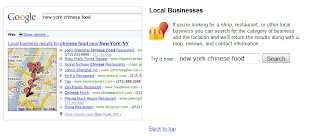
I am certainly going to be showing my 6th graders and High school students this. The next resource I stumbled upon is the Google Help page on Exploring Google Search. Here users can look at the various searching tools. Here's a preview of what you can search for.

When you click on any of the "hot links" listed above you will be taken to little search boxes with mini web browsers next to it. This will show you a real life example on how you can modify/use the search feature.

This can easily be added to a curriculum to help students successfully search on Google.
Monday, February 14, 2011
It's not squared it's cubed!!!
Do you have multiple Youtube videos that you want to use, but don't want to have to click over and over to find them? Are you looking for a way to show your Youtube videos on your website, blog, or other social media site in a way that is creative and interesting for people to see?

This new web 2.0 application is called YouCube. It gives you a 3D cube in which you can add 6 Youtube URL video's that you can twirl through to view.
 This is what the "cube" looks like. You can add your 6 videos at the left hand side of the screen. Below is a picture of what that URL add lines look like.
 Once you have your videos in you can play and view one movie at a time. It's a neat little program that helps organize videos. Check it out some time when you want to be a little more creative. Also you can view other people's "cubes".

Enjoy! The link is found here.
This new web 2.0 application is called YouCube. It gives you a 3D cube in which you can add 6 Youtube URL video's that you can twirl through to view.


Enjoy! The link is found here.
Subscribe to:
Posts (Atom)


